Enumerations – Enum
가독성, 실제로는 숫자로 저장
제한된 값
struct
- Value Type : stack
- 상속이 안됨
- data
- method
- constructor
- property
- event
class
- Reference type : heap
- 상속이 됨
- data
- method
- constructor
- property
- event
public struct Coffee
{
public int Strength;
public string Bean;
public string CountryOfOrigin;
// Other methods, fields, properties, and events.
}
Naming Convention
1. PascalCasing Convention
- NamespaceName, ClassName, MehodName, Property
2. camelCasing Convention
- 변수
int loopCounter;
생성자
- 초기화 목적
- Class 이름과 같아야함
- 반환값 명시하면 안 됨
- 그렇다고 void를 쓰면 안 됨
Property
int strength; // private
public int Strength { get => strength; set => strength = value; }

private string bean;
public string Bean { get => bean; set => bean = value; }
=
int strength; // private
public int Strength
{
    get { return strength; }
    set { strength = value; }
}

private string bean;
public string Bean
{
    get { return bean; }
    set { bean = value; }
}
Auto Property (자동 구현 속성)
public string Country { get; set;}자동으로 private field를 추가 함
비주얼 스튜디오 개발자 명령 프롬프트 -> ildasm
자동으로 추가된 private field 확인 가능,
Collections Array
ArrayList - 추가/삭제 - Length
Hashtable - 검색 - 크기가 고정적
Stack - LIFO
Queue - FIFO
=> object로 저장 Count 속성 크기가 가변적
System.Collections.Generic
LIst<T>
Dictionary<T>
ArrayList 이중연결 리스트
// Create a new ArrayList collection.
ArrayList beverages = new ArrayList();
// Create some items to add to the collection.
Coffee coffee1 = new Coffee(4, "Arabica", "Columbia");
Coffee coffee2 = new Coffee(3, "Arabica", "Vietnam");
Coffee coffee3 = new Coffee(4, "Robusta", "Indonesia");
// Add the items to the collection.
// Items are implicitly cast to the Object type when you add them.
beverages.Add(coffee1);
beverages.Add(coffee2);
beverages.Add(coffee3);
// Retrieve items from the collection.
// Items must be explicitly cast back to their original type.
Coffee firstCoffee = (Coffee)beverages[0];
Coffee secondCoffee = (Coffee)beverages[1];
foreach(Coffee coffee in beverages)
{
Console.WriteLine("Bean type: {0}", coffee.Bean);
Console.WriteLine("Country of origin: {0}", coffee.CountryOfOrigin);
Console.WriteLine("Strength (1-5): {0}", coffee.Strength);
}
private void button1_Click(object sender, EventArgs e)
        {
            listBox1.Items.Clear();
            ArrayList list = new ArrayList();
            list.Add(10); // 10 // int => object: boxing
            list.Add(20); // 10 20
            list.Add(30); // 10 20 30
            list.Insert(1,99); // 10 99 20 30
            list.Remove(20); // 10 99 30
            list[0] = 11; // [] indexer  11 99 30

            foreach (int i in list)
                listBox1.Items.Add(i); //<==
        }
boxing 발생
해결법
Generic
private void button1_Click(object sender, EventArgs e)
        {
            listBox1.Items.Clear();
            //ArrayList list = new ArrayList();
            List<int> list = new List<int>();  //Generic Collections
            list.Add(10); // 10 // int => object: boxing
            list.Add(20); // 10 20
            list.Add(30); // 10 20 30
            list.Insert(1,99); // 10 99 20 30
            list.Remove(20); // 10 99 30
            list[0] = 11; // [] indexer  11 99 30

            foreach (int i in list)
                listBox1.Items.Add(i); //<==
        }
System.Collections
Hashtable, Dictionary
[key, value] key값은 유일 (unique)해야 함
containsKey, containsValue
 private void button2_Click(object sender, EventArgs e)
        {
            Hashtable table = new Hashtable(); //Key의 hash code값으로 정렬 됨
            table.Add(1, "hong"); // key => int object:boxing value - string
            table.Add(3, "kim"); // key => int object:boxing value - string
            table.Add(2, "lee"); // key => int object:boxing value - string
            foreach (DictionaryEntry d in table)
                listBox1.Items.Add(d.Key + "\t" + d.Value);
            if (table.ContainsKey(1))
                listBox1.Items.Add("있다.");
            else
                listBox1.Items.Add("없다.");
        }
private void button2_Click(object sender, EventArgs e)
{
Dictionary<int, string> table = new Dictionary<int, string>(); // SortedDictionary - 키 기준 오름차순 정렬
//Hashtable table = new Hashtable(); //Key의 hash code값으로 정렬 됨
table.Add(1, "hong");
table.Add(3, "kim");
table.Add(2, "lee");
//foreach (DictionaryEntry d in table)
// listBox1.Items.Add(d.Key + "\t" + d.Value);
foreach (KeyValuePair<int,string> d in table)
listBox1.Items.Add(d.Key + "\t" + d.Value);
if (table.ContainsKey(1))
listBox1.Items.Add("있다.");
else
listBox1.Items.Add("없다.");
}Hashtable 대신 제네릭인 Dictionary를 사용하여 박싱 방지
LINQ (Language INtegrated Query)
다양한 데이터를 쿼리할 때 하나의 구문을 사용하자
Stack, Queue
Event
1:N 관계일 때 이벤트 많이 사용
Delegate 대리자
- Method에 대한 대리자
- Event Handler 호출할 때
- Callback Method 호출할 때 : Multi-Thread
delegate로 형식을 제공
public delegate void MyDelegate(string s);
    class Program
    {

        //             클래스 ==> new로 사용
        // class MyDelegate : System.MulticastDelegate
        public static void Hello(string a)
        {
            Console.WriteLine($"Hello {a}");
        }
        public static void Goodbye(string a)
        {
            Console.WriteLine("Goodbye "+ a);
        }

        static void Main(string[] args)
        {
            // Hello("A");
            MyDelegate d1 = new MyDelegate(Hello);
            d1("A");
            // Goodbye("A");
            MyDelegate d2 = new MyDelegate(Goodbye);
            d2("A");

            d2 += new MyDelegate(Hello); // Invocation list에 추가
            d2("B"); // Goodbye("B") Hello("B")
            d2 -= new MyDelegate(Goodbye); // Invocation list에서 제거
            d2("C"); // Hello("C")

            Button button1 = new Button();
            button1.Click += new MyDelegate(Hello);
        }
    }
    class Button
    {
        public event MyDelegate Click; // event 키워드 사용으로 속성창에 추가
    }
Control 만들 때
1. Extended Control 기존 이벤트에 기능 추가/변경
class NumberBox : TextBox
{
// 키보드 이벤트 처리
}
2. Composite Control
- 기존 컨트롤을 묶어서
3. Custom Control
기본 UI가 없음, Paint부터 구현
1. Windows Forms 컨트롤 라이브러리 (.dll)
2. WinForm
Callback Method 호출할 때 : Multi-Thread
delegate로 형식을 제공
Process : 현재 실행 중인 프로그램
-thread + emmory + System resource
thread: a unit of execution
1. Single Thread
2. Multi-Thread
- Thread class로 생성 <----- Mod10Task ( Thread pool에서 연결)
using System.Threading;
Thread t = new Thread();
class Program
    {
        public static  void Test() // Callback Method 직접호출이 아닌 대리자를 통해서 호출
        {
            for(int i=0; i<5; i++)
            {
                Thread.Sleep(2000);
                Console.WriteLine("Test:{0}", i);
            }
        }
        static void Main(string[] args)
        {
            //Test();
            ThreadStart ts = new ThreadStart(Test);
            Thread t = new Thread(ts);
            t.Start(); // <== ts()
            for (int i = 0; i < 5; i++)
            {
                Thread.Sleep(1000);
                Console.WriteLine("Main:{0}", i);
            }
            Console.WriteLine("--Program End-----");
        }
    }
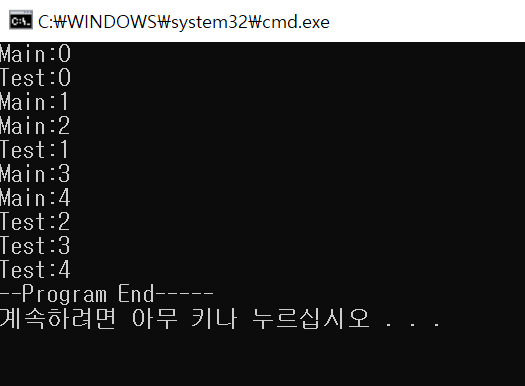
메인이 끝났지만 Test Thread가 계속 실행되는 문제
t.Join() 으로 끝날 때 까지 기다린 후 메인 종료
Class
클래스 이름과 파일이름 달라도 됨
생성자를 따로 구현하면 컴파일러가 자동으로 제공해주는 디폴트 생성자를 쓸 수 없음
단위 테스트
[TestMethod] // Attribute
public void TestGetAge()
{
// Arrange.
DateTime dob = DateTime.Today;
dob.AddDays(7);
dob.AddYears(-24);
Customer testCust = new Customer();
testCust.DateOfBirth = dob;
// The customer's 24th birthday is seven days away, so the age in years should be 23.
int expectedAge = 23;
// Act.
int actualAge = testCust.GetAge();
// Assert.
// Fail the test if the actual age and the expected age are different.
Assert.IsTrue((actualAge == expectedAge), "Age not calculated correctly");
}
솔루션 -> 새프로젝트 -> 단위테스트
Tips
도구 -> 옵션 -> 디버깅 -> 속성 및 연산자 건너뛰기 체크 해제 => 속성 내부도 디버깅 됨
xaml 디자이너 -> 대화형 요소를 만들 때 자동으로 이름 저장 체크
Assembly(.NET DLL이나 EXE)
ildasm - intermediate language dis assembler
비주얼 스튜디오 개발자 명령 프롬프트
'C#' 카테고리의 다른 글
| C# 교육 4일차 (0) | 2023.10.19 |
|---|---|
| C# 교육 3일차 (0) | 2023.10.18 |
| C# 교육 1일차 (0) | 2023.10.17 |
| 2023.09.15 네트워크 통신( EndPoint, TCP 통신) (0) | 2023.09.15 |
| 2023.09.14 BCL - 파일, 스레드, 네트워크 통신 (포트 까지) (0) | 2023.09.14 |
